

Hemingway Editor
Problem: Complex texts. Solution: Color codes highlight weaknesses for improved readability. Result: Clear, concise sentences and a fluid writing style without unnecessary padding.
hemingwayapp.com/ ↗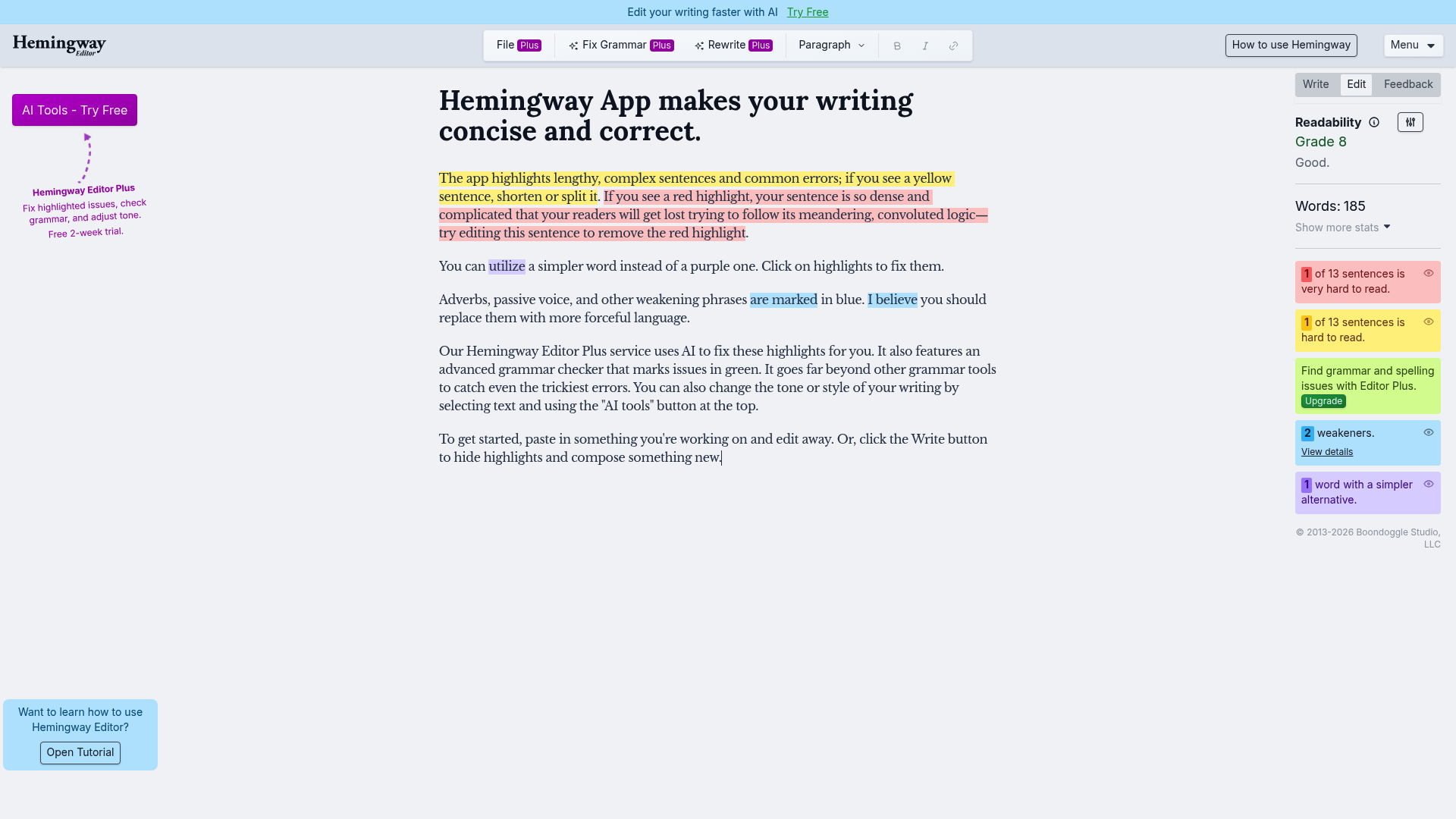
Hemingway Editor Review 2026: Is the Tool Worth It for Improved Readability?
Unique Feature Rating & Critique Ideal for Color-Coded Readability Analysis 4.5/5 - Excellent for Style, but no in-depth grammar check without a Plus subscription. Bloggers, Journalists & Copywriters
Introduction & Conclusion: The Most Important Points in Brief
The Hemingway Editor remains the go-to tool for clear, concise texts in 2026. It solves the problem of nested sentences and unnecessary complexity. While the web version remains free, the Plus version now offers AI-powered rewording. For those who prioritize readability over mere spelling, this is the best solution on the market.
Core functions of the Hemingway Editor
Visual text analysis
The core feature is the color system: Yellow highlights indicate complex sentences, red highlights extremely difficult-to-read passages. Purple shows alternatives for complicated words, while blue highlights adverbs and green emphasizes passive constructions.
Hemingway Editor Plus (AI features)
The new Plus version uses artificial intelligence to directly rewrite highlighted problem passages. Users can adjust tone, length, and style with a click, which massively speeds up the editing process.
Desktop App for Offline Work
The desktop application allows writing without an internet connection and offers direct export functions for WordPress, Medium, and formats such as Markdown and PDF.
Practical Use Cases 2026
- Content Marketing: Optimizing blog posts for maximum comprehensibility and SEO relevance through simple language.
- Academic Writing: Streamlining complex theses to make them accessible to a wider audience.
- Business Communication: Creating clear emails and reports that are understood without questions.
Prices & Value Analysis in Comparison
Hemingway offers a tiered model that differs significantly from competitors like Grammarly or ProWritingAid:
- Web Version: Free for basic analysis without AI features.
- Desktop App: One-time payment of approximately $19.99 (no AI features included).
- Individual 5K (Plus): $10/month (or $100/year) for 5,000 AI credits.
- Individual 10K (Plus): $15/month (or $150/year) for 10,000 AI credits.
Compared to Grammarly, Hemingway specializes more in style and readability, while Grammarly offers broader browser integrations. Hemingway Plus is competitively priced but uses a credit system for AI rewrites.
At a glance
- Industry
- Advertising Services
- Competitors
- GrammarlyProWritingAidQuillBot
- Customers
- Ian M., Anna A., Paul H.
News & updates
The Fast Company article provides insights into how the Hemingway App offers unique tools for writers to streamline their writing processes and enhance clarity. Users appreciate its innovative features that help them recognize and rectify common writing pitfalls.
What users say
The Hemingway Editor stands out in 2026 primarily due to its specialization in text clarity. While competitors like Grammarly offer a broader range of features, Hemingway remains the tool of choice for concise writing. Positive users emphasize its efficiency in revising AI-generated texts, while negative reviews criticize the lack of depth in grammar checking and the rigidity of the rules. With a free web option and an affordable one-time desktop subscription, the pricing structure remains attractive for casual users.
Company
The app highlights lengthy, complex sentences and common errors; if you see a yellow sentence, shorten or split it. If you see a red highlight, your sentence is so dense and complicated that your readers will get lost trying to follow its meandering, splitting logic — try editing this sentence to remove the red.
LinkedIn ↗