
AI Automation: automatizzare i workflow con assistenti AI
·
Ho visto i toolkit di team B2B con 50 automazioni a metà e nemmeno un meeting fissato. Bot, prompt, test: tutto iniziato, niente finito. In molte aziende l'automazione con l'AI è esattamente questo, una collezione di smanettamenti che non toglie lavoro a nessuno ma dà a tutti la sensazione di essere avanti.
La differenza tra giocare con l'AI e lavorare con l'AI non è lo strumento e non è il talento. Sono tre abitudini scomode: parti in piccolo, descrivi con precisione, mantieni il controllo. Salta le tre e produci demo per il prossimo meeting. Portale fino in fondo e deleghi lavoro vero: ricerca, scrittura, ordinamento, preparazione.
Questa pagina è il punto di partenza pratico: come iniziare, come descrivere i task perché gli assistenti AI possano eseguirli e dove stanno i limiti. Scritta per team B2B senza un proprio laboratorio AI: founder, responsabili marketing e sales che vogliono partire con i mezzi che hanno già e che mettono i risultati prima degli esperimenti.
Guido reparti GTM e prodotto con tre professionisti più agenti dove prima sedevano trenta persone. GTM sta per go-to-market, il percorso che il tuo prodotto fa verso i clienti paganti. Questa routine quotidiana mi ha insegnato soprattutto una cosa: gli assistenti valgono quanto gli incarichi, le regole e il controllo che ci stanno dietro.
Cosa impari
- La differenza tra automazione if-then e assistenti AI, e quando ti serve l'una o gli altri.
- Il primo assistente: tre fonti di dati, una regola chiara, un risultato verificabile.
- Ordini di lavoro che una persona e un'AI eseguono senza fare domande.
- Il percorso di maturità dall'assistente all'agente che gestisce un intero workflow.
L'automazione con l'AI funziona se parti in piccolo, descrivi con precisione e mantieni il controllo
È la tesi di questa pagina, volutamente poco spettacolare. Automazione con l'AI significa che i workflow non seguono più solo regole fisse: gli assistenti AI, i cosiddetti agenti, portano a termine interi pacchetti di lavoro da soli: ricerca, scrittura, ordinamento, preparazione. La differenza rispetto a un chatbot in una frase: un chatbot risponde quando chiedi, un assistente esegue un incarico e ti riferisce quando ha finito o quando serve un'approvazione. È proprio questa autonomia a renderlo utile nel lavoro quotidiano, ed è proprio questa a richiedere regole chiare. Il resto della pagina è la dimostrazione, fase per fase, fino all'assistente che porta un intero workflow.
Cosa distingue l'automazione con l'AI dall'automazione classica?
L'automazione classica segue regole if-then fisse: se qualcuno compila un form, allora parte la mail A. Gli assistenti AI vanno oltre. Leggono fonti, traggono conclusioni e producono risultati che prima richiedevano lavoro d'ufficio. Le regole sono prevedibili, gli assistenti sono flessibili. Il mestiere sta nel combinare i due.
L'automazione if-then resta utile, ma ha trappole note, raccolte nei 10 errori della marketing automation: workflow troppo complicati, contenuti deboli, tecnologia prima del concetto. Come si incastrano le due cose lo mostra l'articolo su lead generation e cura dei clienti esistenti: le regole fisse trasportano, gli assistenti AI capiscono e formulano. Un set di regole invia la sequenza, un assistente ci scrive dentro il riassunto dell'ultima conversazione.
Un pacchetto di lavoro tipico è questo: l'assistente legge la trascrizione di una call con un cliente, aggiorna i campi nel CRM, scrive la bozza della mail di follow-up e crea il task per il passo successivo. Quattro mosse che prima restavano ferme finché qualcuno trovava il tempo. Proprio questi residui di lavoro sono il miglior punto di partenza: fanno male, si ripetono e nessuno li difende.
Per una panoramica di cosa sa fare davvero l'AI oggi nel B2B, vedi l'AI nel marketing B2B: capire meglio i clienti, prendersi il lavoro di routine, alleggerire il sales. È la materia prima con cui costruisci le tue prime automazioni.
Come inizi con l'automazione AI senza disperderti?
L'ingresso migliore è un singolo piccolo assistente con tre fonti di dati e una regola chiara, per esempio un briefing quotidiano. Le istruzioni sono in Come iniziare con l'AI nel sales B2B. Partire in piccolo non è mancanza di ambizione. È il ciclo di apprendimento più veloce.
L'unica regola ha due parti e nessuna è negoziabile. Primo: l'assistente mostra le sue fonti. Ogni affermazione nel risultato si può ricondurre a un documento o a un record di dati, oppure salta. Secondo: l'assistente chiede prima che qualcosa esca all'esterno. Nessun testo arriva a clienti, partner o pubblico senza approvazione umana. Con queste due frasi il rischio più grande dell'automazione è disinnescato prima ancora di esistere.
Tre fonti di dati bastano per iniziare: per esempio il tuo CRM, cioè il sistema che contiene tutte le informazioni sui clienti, il tuo calendario e il tuo sito. Più fonti non rendono l'assistente più intelligente finché l'incarico resta vago. Solo quando il briefing quotidiano funziona aggiungi la fonte successiva o il workflow successivo.
Il briefing stesso è volutamente semplice: quali meeting arrivano, cosa è successo dai tuoi clienti più importanti, quali risposte mancano ancora. Se l'assistente ripaga lo noti in fretta, nel tempo di preparazione risparmiato e nelle conversazioni in cui entri più preparato. Se non ripaga, hai perso poco e imparato molto.
Come descrivi i task che un assistente AI può eseguire?
Come un ordine di lavoro che si porta dietro tutto il contesto. Da lì in poi conta il mestiere: un assistente vale quanto il suo ordine di lavoro. Come è fatto un ordine che una persona e un'AI eseguono senza fare domande lo mostra l'anatomia del ticket GTM. Sei blocchi hanno dato buona prova:
- Obiettivo: da cosa capisci che il task è finito?
- Contesto: perché esiste il task e dove si colloca nel workflow più grande?
- Fonti: quali documenti e dati può usare l'assistente?
- Limiti: cosa non deve fare, per esempio inviare qualcosa senza approvazione?
- Esempio: com'è fatto un buon risultato?
- Passo di revisione: chi controlla cosa prima di andare avanti?
Il nocciolo è l'idea del contenitore di contesto: il ticket porta dentro di sé tutto quello che serve per l'esecuzione, invece di dare per scontate conoscenze nelle teste o nelle chat. Tutto quello che dovresti spiegare a un collega nuovo il primo giorno va nell'ordine di lavoro. L'effetto collaterale vale oro: quello che descrivi con precisione per gli assistenti diventa più chiaro anche per le persone.
Dietro c'è un'intuizione più vecchia, che viene dal sales. Jacco van der Kooij descrive la vendita in The SaaS Sales Method come una scienza: un processo misurabile fatto di passi definiti, invece dell'intuito di singoli fuoriclasse. È questa visione per processi a rendere i workflow trasferibili, a nuovi collaboratori come agli assistenti AI. Se non sai descrivere il tuo workflow, non puoi nemmeno automatizzarlo.
Cosa sa fare l'AI nella scrittura e cosa resta a te?
L'AI è forte sui testi informativi: riassunti, documentazione, descrizioni di prodotto, prime bozze. È debole sullo storytelling, sulla presa di posizione e su tutto quello che dovrebbe suonare come te. La mappa onesta è in creare contenuti con l'AI.
Una regola pratica collaudata: l'AI consegna il primo 70%, cioè liste, ricerca e bozza. L'ultimo 30%, giudizio, tono e approvazione, resta a te. Delega anche quell'ultimo 30% e suoni come tutti gli altri che usano lo stesso modello. E questa uguaglianza sul mercato si sente subito.
La personalizzazione è un caso a parte. L'AI può distribuire i contenuti in varianti per settore e ruolo, in automatico e su larga scala. Come si fa bene lo mostra l'iper-personalizzazione nel B2B. Anche qui vale la divisione del lavoro: le varianti sono mestiere dell'AI, il messaggio centrale resta una tua decisione.
Il limite: il volume non è un risultato
La trappola più grande dell'automazione con l'AI è accelerare la cosa sbagliata. Se tutti mandano gli stessi messaggi in automatico non vince nessuno, come mostra l'AI sta uccidendo l'outbound. Outbound significa che contatti attivamente i potenziali clienti invece di aspettare le richieste. Più il singolo messaggio costa poco, più le inbox si riempiono e più la rilevanza vale.
Per il mercato di lingua tedesca ci si mette anche il lato legale: le mail a freddo di massa richiedono in genere il consenso in Germania e Austria, e anche la legge svizzera sulla concorrenza sleale pone dei limiti. L'automazione non cambia nulla di tutto questo, moltiplica solo il rischio. Tanto più contano i canali tuoi e i destinatari che già ti conoscono.
La via d'uscita è il contesto invece del volume: assistenti che lavorano sulla conoscenza della tua azienda, per persone per cui il momento è quello giusto. Quindi misura le risposte, non i tassi di apertura. Una risposta vera dice di più sull'impatto di mille mail aperte. Se un workflow automatizzato non produce conversazioni migliori, è lavoro fine a sé stesso, non automazione.
Il percorso di maturità: da giocattolo a membro del team
L'automazione con l'AI non è un interruttore che accendi, è un percorso in tre fasi. Fase 1: l'assistente ti supporta, il lavoro lo fai tu, lui ti passa il materiale. Fase 2: l'assistente automatizza singoli passi, come la ricerca o una prima bozza, e tu controlli ogni risultato. Fase 3: l'assistente gestisce un intero workflow, con approvazione umana nei punti sensibili. Ogni fase arriva solo quando la precedente gira in modo affidabile.
Un esempio di fase 3: un assistente prepara le risposte alle richieste in arrivo. Legge la richiesta, prende le informazioni dai tuoi documenti, scrive la bozza della risposta e la manda in approvazione. Una persona controlla, preme invia e si prende la responsabilità. È così che cresce la fiducia nel workflow, passo dopo passo.
Questo percorso è la vera risposta alle 50 automazioni a metà: impone un ordine dei passi. Come cambiano i team quando gli assistenti si prendono responsabilità vere lo mostra Dal vibe coding all'agentic engineering, con l'esempio dello sviluppo software: guidare invece di fidarsi alla cieca. L'immagine di arrivo è in Agentic GTM: da 30 a 3: team piccoli che guidano assistenti invece di team grandi che macinano routine.
Qui rientrano due temi vicini. La domanda strategica su dove l'AI crei davvero valore per il business, e cosa questo pretenda dalle fondamenta, è organizzata nell'hub B2B Automation & AI. E il lato classico dell'automazione, cioè regole, campagne e passaggio di consegne tra marketing e sales, è raccolto nell'hub Marketing & Sales Automation. La pratica senza strategia si perde nei dettagli, la strategia senza pratica resta sulla carta.
Il mio verdetto: lavorare invece di giocare
✅ Cosa brilla: un assistente con un incarico chiaro, tre fonti e una regola. Ti toglie lavoro vero dalla prima settimana: ricerca, preparazione, prime bozze, manutenzione dei dati, verificabile e tracciabile.
❌ Cosa non brilla: giudizio, tono e comunicazione delicata. L'ultimo 30% resta a te, oppure suonerai come tutti gli altri sullo stesso modello.
⚠️ Attenzione: l'automazione amplifica anche la cosa sbagliata. Accelera il volume invece della rilevanza e riempi le inbox, rischi grane legali e danneggi la tua reputazione.
Il che ci riporta alle 50 automazioni a metà dell'inizio: non mancavano le idee, mancava la sequenza. Un assistente, tre fonti, una regola, poi la fase successiva. È così che il gioco diventa lavoro e uno strumento diventa un membro del team. Se vuoi la scorciatoia lungo il percorso, ricevi i miei appunti dal campo nella newsletter.
Qui sotto trovi tutti gli articoli sul tema, ognuno descritto in parole semplici.
Tutti gli articoli su questo tema

AI sales roles in 2030: the return of the full-cycle seller
AI will not replace the salesperson. It replaces the machinery around them: research, preparation, documentation, CRM updates, routine follow-up. What remains is an AI-native full-cycle seller who owns the customer relationship from first signal to renewal, with agents that prepare and keep systems current. The durable advantage is not the agent but customer memory: every signal connected, permissioned, retrieved the moment a human or an agent needs it.

Forward deployed engineer: prima mappa il processo
Un forward deployed engineer (FDE) lavora dentro un'azienda, mappa come il lavoro si svolge davvero e lo ricostruisce con gli agenti. I titoli sugli stipendi mancano il punto. Quello che viene pagato è la mappatura dei processi, non il prompting. In un caso di contabilità fornitori tratto da un episodio recente di un podcast, 17 passi sono diventati 7 e il costo per fattura è sceso da 31 a 6 dollari. Prima mappa, poi smista ogni passo in uno di quattro secchi, poi costruisci.

State of Go-to-Market 2026: ibrido, retention e AI
Lo stato del Go-to-Market nel 2026 sta in tre cambiamenti. Le motion ibride sono lo standard, e le aziende High-Growth aggiungono un ingresso Self-Serve che porta già circa il 20% dei ricavi, più del doppio della media delle altre. Pricing e retribuzione seguono: il 48% usa un pricing ibrido, e gli AE vengono pagati sempre più su ricavi netti e retention. La crescita sta riaccelerando e i deal si chiudono sei settimane più in fretta, ma i contratti si accorciano. Le aziende che staccano il gruppo hanno l'AI integrata nel Funnel: Quota Attainment più alta in ogni segmento, con team più piccoli.

Termini AI GTM: i 13 che ti servono davvero nel 2026
13 termini AI GTM spiegati come un unico sistema: i segnali decidono chi contatti, il context tiene precisi gli agent, le persone tengono il giudizio, e l'AEO decide se i motori di risposta ti citano.

Come iniziare con l'AI nelle vendite B2B
Iniziare con l'AI nel sales, senza gergo tecnico: un piccolo assistente che si prende ricerca e preparazione, più i canali tuoi perché i buyer sentano prima te.

Agentic GTM e product engineering: la leadership è il nuovo collo di bottiglia
L'AI ha reso l'esecuzione economica. Il collo di bottiglia ora è il contesto condiviso: come un piccolo team di persone e agenti guida ciò che prima richiedeva un reparto.

Anatomia del ticket GTM nell'era degli agenti autonomi
Un task è descritto bene solo quando una persona e un assistente AI lo eseguono senza fare domande. Ecco com'è fatto un ordine di lavoro così.

L'AI sta uccidendo l'outbound: cosa LinkedIn può ancora salvare
L'AI rende il contatto a freddo quasi gratis, così ogni inbox affoga. Cosa arriva ancora a destinazione: la tua reputazione, il tuo contesto, il tuo profilo LinkedIn.
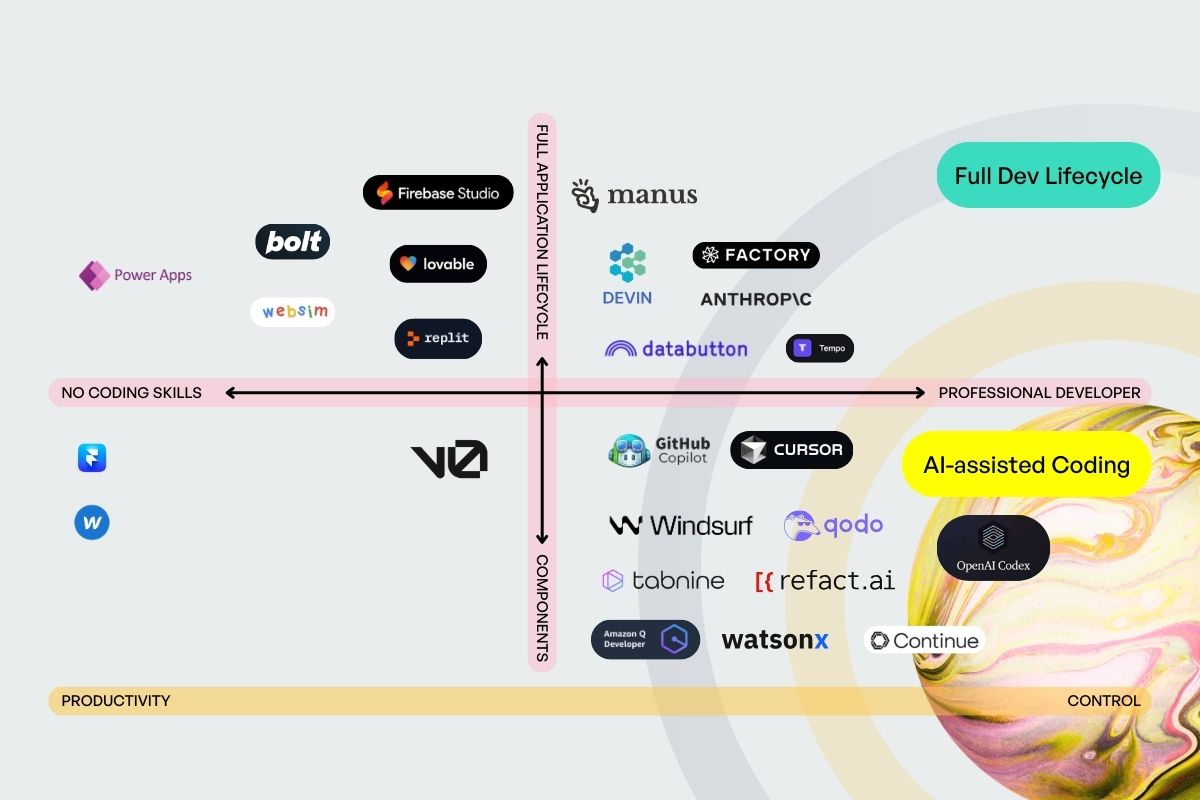
Dal vibe coding all'agentic engineering
Programmare a braccio con l'AI ha lasciato i postumi: codice insicuro, team più lenti. Ora conta guidare gli assistenti AI invece di fidarsi alla cieca.

Come usare l'intelligenza artificiale nel marketing B2B per vendere di più
Cosa sa fare davvero l'AI oggi nel marketing B2B: capire meglio i clienti, prendersi il lavoro di routine, alleggerire il sales. Con casi d'uso concreti.

Come funziona l'iper-personalizzazione nel B2B?
Il tuo sito si adatta in automatico a ogni visitatore: esempi diversi, parole diverse, stesso nucleo. Come funziona nel B2B.

10 errori da evitare nella marketing automation
I 10 errori più comuni nel marketing automatizzato, dai workflow troppo complicati ai contenuti deboli, e come evitarli.
Marketing automation: lead generation o cura dei clienti esistenti?
Acquisire nuovi clienti o curare quelli esistenti? Con l'automazione non devi scegliere. Come fare entrambe le cose con un team piccolo.

Creare contenuti con l'AI: le macchine scrivono meglio degli umani?
Sui testi informativi l'AI scrive quasi come una persona. Sullo storytelling non basta. Dove aiuta il tuo marketing e dove no.
Domande frequenti
Qual è la differenza tra un assistente AI e un chatbot?
Un chatbot risponde quando chiedi. Un assistente AI, cioè un agente, esegue un incarico: legge le fonti, trae conclusioni, produce risultati e ti riferisce quando ha finito o quando serve un'approvazione. La differenza è l'autonomia.
Quali workflow si prestano per primi all'automazione con l'AI?
Il lavoro ricorrente con fonti chiare e risultati verificabili: ricerca sulle aziende, preparazione dei meeting, prime bozze di testi, manutenzione dei dati. Per iniziare non va bene tutto ciò che richiede giudizio o comunicazione delicata.
Come mantengo il controllo sui workflow automatizzati?
Con due regole: l'assistente mostra le sue fonti e chiede prima che qualcosa esca all'esterno. Aggiungi un ordine di lavoro scritto in modo chiaro, con obiettivo, limiti e un esempio. Così resta tracciabile cosa è successo e perché.
Com'è fatto un percorso di maturità sensato per l'automazione con l'AI?
Tre fasi: prima l'assistente ti supporta e ti passa il materiale. Poi automatizza singoli passi, come la ricerca o le prime bozze, e tu controlli ogni risultato. Infine gestisce un intero workflow, con approvazione umana nei punti sensibili. Ogni fase arriva solo quando la precedente gira in modo affidabile.
Mi serve un team di sviluppo per l'automazione con l'AI?
Non per iniziare. Un primo assistente lo costruisci con i tool che hai già. Contano un ordine di lavoro scritto in modo chiaro e l'accesso alle fonti di dati giuste. L'engineering interno ripaga solo quando un workflow ha dimostrato di creare valore.